Why Finger Placement Matters When You Learn to Type
You can type a familiar word quickly, then get stuck halfway through the next one. Your index finger reaches across for a letter, another finger takes it on the next attempt, and a glance down gets you moving again.
That is where a finger pattern can help. Following a consistent keyboard finger pattern gives you a repeatable way to reach each key. For a beginner, the conventional home-row system supplies that pattern instead of leaving every reach to chance.
There is a catch: copying the chart perfectly is not the only way to become a capable typist. Research has found fast self-taught typists who use fewer fingers. The important distinction is between a reliable movement and a finger choice that keeps changing because you are unsure where to go.
What is the standard keyboard finger pattern?
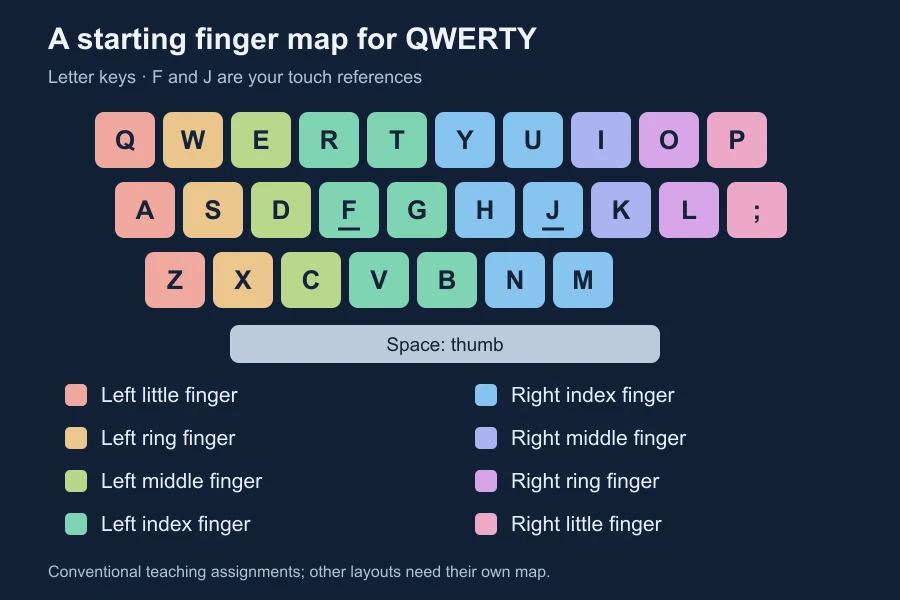
On a standard QWERTY keyboard, the usual starting positions are A, S, D, F for the left hand and J, K, L, semicolon for the right. Your index fingers locate the raised marks on F and J, and a thumb handles Space.
The University of Wollongong’s touch-typing guide explains this home-row position and the surrounding key areas. Each finger has a section to learn, so you can practise a reach from a familiar starting point.
| Finger | Home key | Conventional letter keys |
|---|---|---|
| Left little finger | A | Q, A, Z |
| Left ring finger | S | W, S, X |
| Left middle finger | D | E, D, C |
| Left index finger | F | R, T, F, G, V, B |
| Right index finger | J | Y, U, H, J, N, M |
| Right middle finger | K | I, K |
| Right ring finger | L | O, L |
| Right little finger | Semicolon | P |
This table covers letters, not every number, symbol, or control key. It describes a conventional QWERTY teaching map; other layouts and adapted techniques need their own map.
Why does consistent finger placement matter?
Think about learning the letter E. In the conventional pattern, your left middle finger reaches from D toward E. That gives you something specific to practise and inspect.
If you miss, you can ask useful questions: did the hand drift, did the finger reach too far, or did the next letter arrive before this one? You have a repeatable action to work on. If three different fingers keep taking E because you cannot find it, the same error is harder to untangle.
This is a practical reason to follow a pattern when learning. It turns “I keep making typos” into “this particular reach needs work.” It does not mean every typo comes from incorrect fingering.
There is research behind the emphasis on consistency. In the 2016 study How We Type, researchers observed 30 participants using motion capture and eye tracking. Faster performance was associated with consistently using the same finger for a key, preparing upcoming keystrokes, and less movement of the whole hand across the keyboard.
Those were associations in a small observational study, not proof that remapping one finger will add a particular number of words per minute. They support paying attention to how reliably you reach a key, rather than counting fingers alone.
Do you need all ten fingers to type well?
No. The same study found no significant difference in sentence-entry performance between its touch-typing and non-touch-typing groups. Some self-taught participants were fast despite using fewer fingers.
The researchers’ project page also describes a range of techniques between hunting for keys and conventional touch typing. A person can develop a dependable personal pattern through everyday keyboard use.
For a beginner, though, inventing that pattern while also learning where the letters are adds another task. A conventional map gives you a starting plan. You can follow the lesson’s finger assignment, observe the result, and work on one unfamiliar movement at a time.
If you already type comfortably and accurately, a chart difference alone is a weak reason to replace every habit. Look for an actual problem: repeated searches, a troublesome reach, or corrections that interrupt your work.
The benefit becomes clearer in a word
Try desk slowly using the conventional assignments:
- D: left middle finger.
- E: left middle finger reaching upward.
- S: left ring finger.
- K: right middle finger.
D and E use the same finger. A standard pattern does not eliminate every consecutive reach or guarantee an effortless rhythm. It gives you a predictable sequence to learn.
If “desk” becomes “desl,” inspect the K reach. If it becomes “deks,” inspect the order of S and K. Those are different mistakes, and repeating the whole word faster may hide the difference.
Once the word feels reliable, place it in a sentence:
Leave the folder on my desk.
Then try a fresh sentence containing “desk.” A clean memorised word is useful practice, but it is only part of the task. You still need spaces, capitals, punctuation, and unfamiliar transitions.
For more examples of wrong keys and scrambled letters, read our guide to typing fast but making mistakes.
Should every finger return home after every letter?
Use the home row as a reference, especially when you lose your place. You do not need to interrupt every word with a deliberate reset of all eight fingers.
For a beginner drill, returning the finger after an isolated reach can help you observe where it starts. In a flowing word, let the sequence continue. Pause and reorient when needed rather than adding an extra ritual between every keystroke.
Also, keeping your hands near their starting area does not mean pressing your wrists into the desk. Our wrist-position guide explains the difference between freely moving hands during typing and palm support during pauses.
How to practise the pattern without getting overwhelmed
Choose a small problem you can recognise. If every letter is unfamiliar, start with the home row. If most letters are easy, work on the reach that interrupts you.
- Find your reference. Locate F and J by touch, then check your starting position.
- Choose one reach. Follow the finger assignment in your lesson and move slowly enough to notice which finger presses the key.
- Add a short word. Include the key in a simple sequence, then check both the letters and their order.
- Use it in a new sentence. Avoid judging progress only on a drill you have memorised.
- Note the recurring problem. Record the awkward key or transition, not just the final WPM.
These are practice suggestions, not a research-tested schedule. You can use KeysInFlow’s finger lessons for the initial home-row movements and hand lessons to combine them.
Keep correction rules and passage difficulty similar when comparing sessions. KeysInFlow can score your keystrokes, but it cannot see which finger you used. A clean result and a consistent movement are things you need to observe separately.
Frequently asked questions
Is typing with the wrong finger always bad?
An occasional different reach is not enough to judge a technique. For a learner, following a stable assignment makes practice easier to review. For an experienced typist, consider accuracy, comfort, and whether the movement interrupts the task.
Which finger should press B?
The conventional map shown here assigns B to the left index finger. If a course or an adapted keyboard teaches a different assignment, follow its map consistently while learning it.
Why am I slower when I change my finger placement?
You may be replacing a familiar action with one that needs conscious attention. An early comparison measures that transition as well as the technique. It cannot tell you how fast you will eventually become.
Will following the finger pattern stop spelling mistakes?
It gives you a way to practise key movements. It cannot tell you how a word is spelled or whether the sentence says what you intended. Check the word itself when spelling is the problem.
Pick one word that regularly trips you up. Watch which fingers handle it, slow the uncertain transition, and put it back into a sentence. That is a concrete reason to learn a finger pattern: you have a movement you can recognise, practise, and use again.