Code Typing Practice: Symbols, Indentation, and Accuracy
Code typing practice means copying source text accurately, including symbols, capitalization, spaces, and line breaks. It is useful for isolating keyboard movements that interrupt your work, but a code WPM score does not measure programming skill or how quickly you can solve a problem.
Start with code typing practice if you want a snippet immediately. For a sequence of exercises, use the programming typing lessons.
Try a short code typing session
- Take one comfortable attempt in the code typing tool and note the language, accuracy, and WPM.
- Pick one movement that interrupted you. Repeat a symbol drill or naming drill with attention to that movement.
- Return to another snippet in the same language. Compare accuracy first, and note whether the difficult transition felt easier. Different snippet lengths and symbols can change WPM, so avoid treating one score as proof of improvement.
Use this as a practical session structure, not a guaranteed improvement schedule. Stop or take a break when you lose concentration.
Find the transition that causes the pause
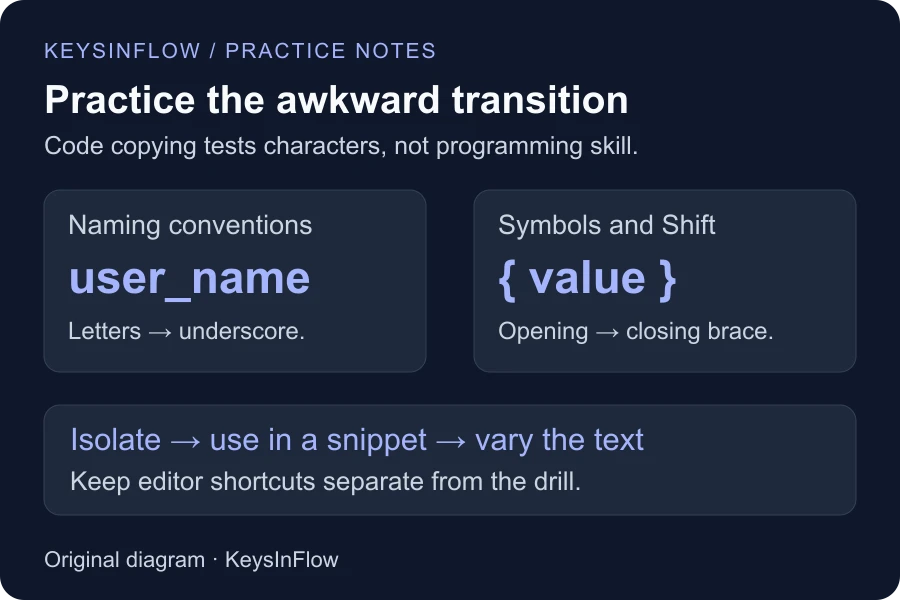
Read a short snippet and notice where you hesitate. Is it the jump from a letter to an underscore? Pressing Shift for a brace? Closing a quoted string? A full snippet can hide those details inside a single overall score.
Try Symbols Intensive for brackets and operators. Use camelCase and snake_case practice when the problem is switching between letters, capitals, and underscores. These exercises let you repeat the movement without also reading a long program.
Pick a language you use
- Python typing practice gives you spaces, colons, and indentation to reproduce.
- JavaScript typing practice includes braces, operators, and case-sensitive names.
- SQL typing practice focuses on query text, keywords, and punctuation.
- HTML and CSS typing practice includes tags and property syntax.
- Java typing practice combines longer declarations and nested punctuation.
- C/C++ typing practice uses the C-style snippets provided in the course.
The goal is to enter the displayed text, not to rewrite it in your preferred style. The practice tool does not compile, execute, or grade the program’s behavior.
Keep editor shortcuts separate from the drill
An editor may insert closing brackets, indent a new line, expand a completion, or format a block automatically. KeysInFlow asks you to enter the characters shown in the snippet. Use spaces for its indentation and Enter for its line breaks.
That makes the exercise different from daily editor work. Use it to find awkward movements, then practice editor shortcuts in your actual editor. Do not disable useful editor features merely to make your work resemble a typing drill.
Use an accuracy-first comparison
Take a comfortable first attempt, identify one difficult transition, and repeat while slowing down before that point. Compare similar snippets rather than treating a high score on a familiar Python fragment as an improvement over a lower score on unfamiliar SQL.
KeysInFlow’s WPM formula uses correct characters in standardized five-character units. Spaces and punctuation matter. Accuracy retains character-entry errors even when you correct them, so use both measurements to review an attempt.
Move back to varied text
Once a repeated snippet feels easy, switch to another example. Memorizing a passage can improve the score without showing whether the movement transfers to new text. If you need a specific pattern, use custom typing practice with a short example you have permission to use. Leave out credentials and confidential code.
Finish with the one-minute typing speed test if you also want a baseline for everyday words. Use the same difficulty and duration when comparing prose attempts, and review accuracy alongside WPM. Code, ordinary sentences, and original writing place different demands on you; keep those results separate.
Worked example: preserving Python indentation
Copy this example with four spaces before return:
def double(value):
    return value * 2
Writing return at the left margin changes the block structure. In this copying exercise, one missing space also shifts subsequent character comparisons. Correct the first mismatch before continuing rather than treating all later highlights as separate knowledge gaps.
Open the Python lesson, try Indentation and conditions, then select Fresh transfer passage. Enter spaces manually; Tab moves focus. Review missed Space and Enter entries as well as letters. This is an illustrative copying exercise: the tool does not execute Python or evaluate whether a program solves a problem.