Typing Fast but Making Mistakes? Improve Accuracy

You finish typing a message, look back at it, and realize half your next job is deleting what you just wrote. “The” became “teh.” “From” became “form,” which the spellchecker seems perfectly happy with. Somewhere in the middle, a missing space has joined two words together.
The frustrating part is that you know what you meant to type. You know the spelling. Your fingers can move quickly enough. They just don’t always land where you intended, or they get the right letters down in the wrong order.
Use the one-minute typing speed test to record a starting WPM and accuracy with consistent settings. Fixing recurring mistakes takes a closer look at the errors themselves; the exercises below help you choose what to practice next.
Fast fingers can still produce slow writing
In 2018, researchers from Aalto University and the University of Cambridge analyzed 136 million keystrokes from around 168,000 volunteers. They identified a relatively fast group, averaging about 65 WPM, whose error rates remained comparatively high. The fastest group averaged about 68 WPM and had the lowest rates of uncorrected errors and letter substitutions. Quick keystrokes alone didn’t guarantee both speed and accuracy. Read the original study.
A quick burst followed by several corrections can feel fast because your hands barely stop moving. But some of that movement is undoing the previous movement. Cambridge’s advice accompanying the research is to pay attention to errors and reduce your pace enough to avoid them, because correcting mistakes costs time. Cambridge’s explanation.
The useful question is how much of your typing survives the first pass.
Look at what went wrong before choosing a drill
“Bad accuracy” can describe several different problems. Save a small sample of your mistakes before correcting them, then compare them.
| Intended | What appeared | What to investigate |
|---|---|---|
| good | giod | Landing on a neighboring key |
| the | teh | Getting the letter sequence out of order |
| please | plese | Missing a letter |
| letter | lettter | Adding an extra press |
| send it | sendit | Missing a word boundary |
| from | form | Producing a real word with the wrong meaning |
The examples tell you what happened, though they don’t establish the cause by themselves. If the same neighboring key keeps appearing, watch that reach at a comfortable pace. If the right letters arrive in the wrong order, watch the transition. If errors cluster around spaces, practice complete phrases.
Use the typing error analyzer for a fresh passage and a ranked list of the expected characters you missed. Its error counts include entries you corrected with Backspace. The “slowest keys” list measures gaps between character entries, so reading pauses and corrections can affect it; it cannot diagnose which finger caused a mistake.
If the same keys recur across saved attempts, try weak-key typing drills. Each listed key needs at least five attempts and one error in this browser. This is a minimum sample, not proof of a persistent weakness. When storage is unavailable, use the analyzer’s single-session “Practice these keys” option instead.
Our Finger Heatmap Analyzer includes an error view for identifying troublesome keys. Keep actual mistyped words alongside it: a key-level summary and a word can reveal different parts of the problem. The heatmap uses standard finger assignments; it cannot see which physical finger you used.
When the whole word comes out scrambled
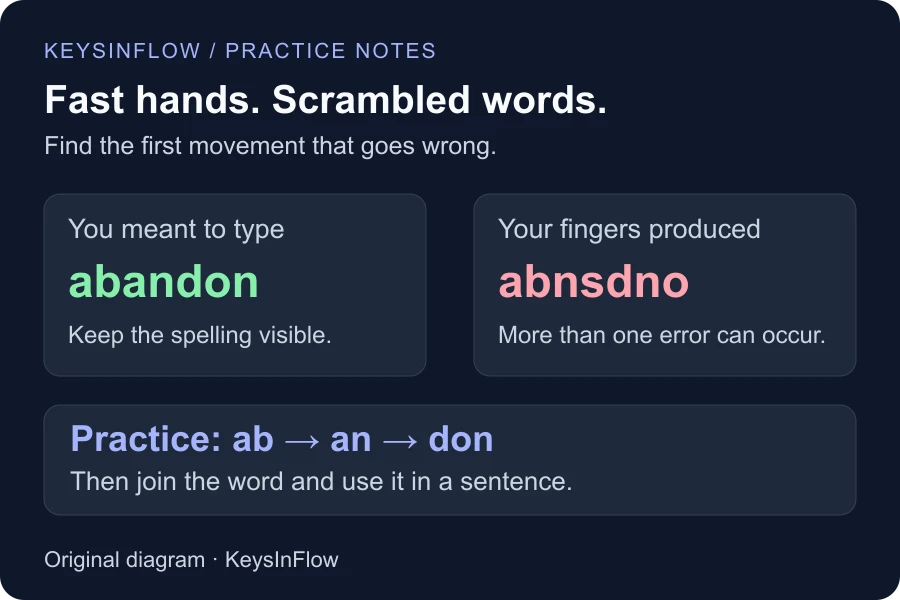
Sometimes the mistake goes beyond two letters switching places. You mean to type abandon, but at speed your fingers produce abnsdno. You know the word, yet the result contains a mixture of wrong letters and letters arriving in the wrong places.
The finished typo alone can’t tell you exactly why it happened. Slow the word down and watch where it first goes off track. Does the mistake start after “ab”? Do you miss the middle “a”? Does your hand shift as you reach for the next key?
Try smaller parts: ab, then an, then don. Join them gradually, keeping the spelling visible as you practice. Once the whole word feels comfortable, put it into a sentence:
We decided to abandon the original plan.
Then try a different sentence. If it scrambles again, return to the first troublesome transition and give it more time. This is a suggested way to inspect and practice the sequence, not a diagnosis from one typo.
Slow down where the mistake happens
“Just type slower” leaves you with an awkward question: how slow, and for how long?
Try a pace at which you can notice the movement you keep missing. You don’t need a universal WPM target. If you regularly type “teh,” try “the,” “them,” “then,” “these,” and “there,” giving the t-h-e sequence enough time to stay in order. Then put it back into a sentence:
Send them the notes, then leave them there.
Getting a word right while concentrating entirely on it is useful practice. Everyday writing asks you to make that movement while also thinking about everything around it. Once the words feel comfortable, try fresh text and check whether the improvement carries over.
Practice the transition, not just the letter
A letter can be easy on its own and awkward after another letter. Pressing “h” repeatedly may do little for someone who keeps reversing “th.”
Try the pair deliberately, use it in different words, put those words in a sentence, and finally check unfamiliar text. Our Bigram & Trigram Trainer provides practice with common combinations. Use it for patterns that match your mistakes, then return to ordinary sentences.
You don’t need to exaggerate every keypress into a separate movement. The large typing study found that fast typists often overlapped successive presses. The aim is to preserve the intended letter order as your pace increases, rather than force a particular motion simply to raise a score.
Check your starting position
If several neighboring keys go wrong together, watch where your hands are starting. On a standard QWERTY keyboard, the raised marks on F and J provide a reference without looking down.
A small Aalto study of 30 people found that some self-taught typists performed similarly to trained touch typists. Faster typing was associated with consistent finger use and less movement of the whole hand.
Watch one troublesome word slowly. Does the same finger usually make the reach? Does your hand shift farther than expected? Does the trouble start after reaching for Backspace? Those observations give you something specific to practice.
A spellchecker can miss a changed meaning
“Form” is a word. So is “now.” A message intended to say “We are not ready” can become “We are now ready” without an obvious spelling warning.
Read important messages once for meaning, especially names, dates, amounts, and short words that change the instruction. Also separate keyboard mistakes from spelling uncertainty. If you can spell a word correctly aloud but keep mistyping it, practice its movements. If you’re unsure of the spelling before touching the keyboard, confirm it first.
Try one focused ten-minute session
The timings below are a practical starting point, not a research-established formula.
- Two minutes: type unfamiliar text at your normal pace and save a few mistakes.
- Three minutes: choose one recurring key or sequence and practice it deliberately with a weak-key drill or letter-combination exercise.
- Three minutes: use those words in sentences, including spaces and punctuation.
- Two minutes: type a fresh passage and check whether the same mistake returns.
Record WPM, accuracy, and the pattern you worked on. Keep test settings consistent when comparing sessions. On a simple character-entry calculation, 95% accuracy across 400 entries means 20 incorrect entries, not necessarily 20 misspelled words. Different tools handle corrections differently; read KeysInFlow’s scoring explanation before comparing numbers.
For your next session, pick the word you keep deleting. Work on its first troublesome movement, put it into a sentence, then try fresh text. A paragraph that needs fewer repairs is useful progress even before the WPM number moves.